
1. Help that can keep improving
Imagine preparing a customer update with an AI assistant. You provide a supplier’s note, correct an interpretation that sounds too certain, and get a more faithful message. It would also help to retain the lesson behind that improvement: distinguish an estimate from a confirmed commitment. That lesson could improve the message you are writing now and help with a different situation later.
kernel_chat gives this way of working a foundation you can keep and inspect. It connects instructions, sources and competences so the assistant can recover the current situation, use relevant methods and improve them through experience. A competence is practical know-how: knowledge, reasons and methods that help with understanding or doing something. It might concern source reading, maintenance, writing, study or another field.
You can ask directly for what you need. There is no need to know competence names or choose a procedure in advance. You can also begin with a situation you do not yet fully understand: the assistant can help identify useful possibilities and the information that would change your choice.
Here, kernel means the core knowledge and relationships that guide the system. Its knowledge is kept in readable, adaptable documents and instructions in a source you control. It participates in the work through an AI model and the tools provided by the environment you use; the quality of its contribution needs to be observed in that actual setting.
kernel_chat can be adopted in environments from different providers. ChatGPT has a documented configuration route, described in chapter 10. For other environments, what matters is persistent instructions and a source the assistant can reach; a model’s name alone does not establish compatibility.
2. Instructions, saved knowledge and conversation
Three places help explain how the work continues.
- The entry instructions tell the assistant how to work through the kernel and where to find its knowledge. They are persistent when they remain available after the conversation closes, within the scope where you saved them. A service may have instructions for the whole assistant, a project or another space.
- The knowledge source holds the kernel, methods and context that should remain available. It may be a knowledge collection, a repository, accessible files or another durable source. A repository is a project folder with a history of changes; GitHub is a service that can host it.
- The conversation is where you ask questions, share material, inspect results and correct the work. To continue later, useful knowledge also needs to reach the source that will be used then.
The instructions point to the source; the assistant uses its knowledge when it matters to the current work. When the work teaches something reusable, that knowledge can return to the source and contribute to another task. The same relationship can work through an interface other than a chat.
“The assistant wrote it in a reply” and “the method was saved in the source” describe different results. If the environment provides source-writing tools and the action is authorized, the assistant can update that source. Otherwise, it supplies the complete updated text or file for you to save through the available means.
The kernel organizes knowledge and ways of working. Internet access, file reading and writing, sending messages and scheduled activity depend on the tools actually available in the environment. A read connection does not automatically provide permission or means to write.
3. Prepare your environment
The package and reference documentation are available in the kernel_chat 1.2.0 release. The guide you are reading helps you find your way; the package contains the knowledge to make available to the assistant.
You can ask for help with setup. This request starts with the means actually available:
I would like to use kernel_chat in this environment. Help me identify where I can save the instructions and which durable source you can read. Follow the official procedure that fits this case. Carry out the steps supported by your current tools and authorization; for the others, give me the exact action needed. Distinguish what is prepared, what is saved and what you can actually reach.
This request guides setup assistance. Adoption also requires the kernel package, a saved entry and a working connection to the source.
If a persistent source is already reachable, use it in place. It might be a repository, a knowledge collection or files accessible through a service connection. It needs to contain the kernel knowledge and remain reachable in the conversations or interactions where you want to use it. Avoid extra copies when the existing connection is sufficient.
If the service retains files in a project or knowledge space, that area can become the kernel source. Alongside the main documents, it needs the practical methods they reference. The official setup guide identifies the required bodies and explains how to preserve references when the service changes filenames or does not retain folders. An assistant with suitable tools can help do this; you do not need to reconstruct the package’s organization yourself.
If you can only attach files to the current conversation, those materials can help now. To reach them in another session, you will need a persistent location accessible there too. A temporary attachment does not establish that continuity by itself.
A compatible environment uses the official portable entry, with its source reference adapted to the location actually available. There is no need to compress the entire kernel into one message. A provider-specific adapter can simplify configuration; when the environment already has the required means, the portable entry may be sufficient.
An example outside ChatGPT: instructions and files in the same space
Imagine a service that lets you retain instructions and documents in a working area. You call it “Working with AI.” This illustrates the functionality to look for: names and buttons depend on the service, and an area called a “project” does not by itself guarantee both capabilities.
- Make the knowledge available. In that area, have the kernel_chat package documents uploaded or connected, including the practical methods identified in SETUP. If you start from the download, open the ZIP on your computer and extract the files when the service cannot read archives directly. This guide’s PDF and the example ZIP help you understand and practise; the kernel package is the one linked at the start of this chapter.
- Prepare the entry. Have the complete portable entry adapted to your chosen source. The placeholder
{{KERNEL_SOURCE}}is the part to replace with the actual reference, such as “persistent documents in the Working with AI area.” References to kernel files and sections must also work, following the SETUP mapping. Ask for help preparing this rather than rewriting the kernel’s method from scratch. - Save the instructions in the right place. Use the instruction area the service applies to that space, rather than only the box where you type a message. The assistant prepares the text; perform the settings saves that require your involvement. You can then ask your first real question or use chapter 4.
A useful request during preparation is:
My space is called “Working with AI.” I use its persistent documents as the source. Starting from the portable entry and SETUP for kernel_chat 1.2.0, prepare the complete text to save in this space’s instructions. Identify the files actually available and make their references usable. If you cannot read one of these sources, tell me which document I need to supply before you prepare that text.
If a repository or knowledge collection is already connected and readable, the source can stay there: the entry points to that location and the actual connection remains in place. GitHub and Python are not requirements of this files-and-instructions example; they belong to the reference ChatGPT route in chapter 10.
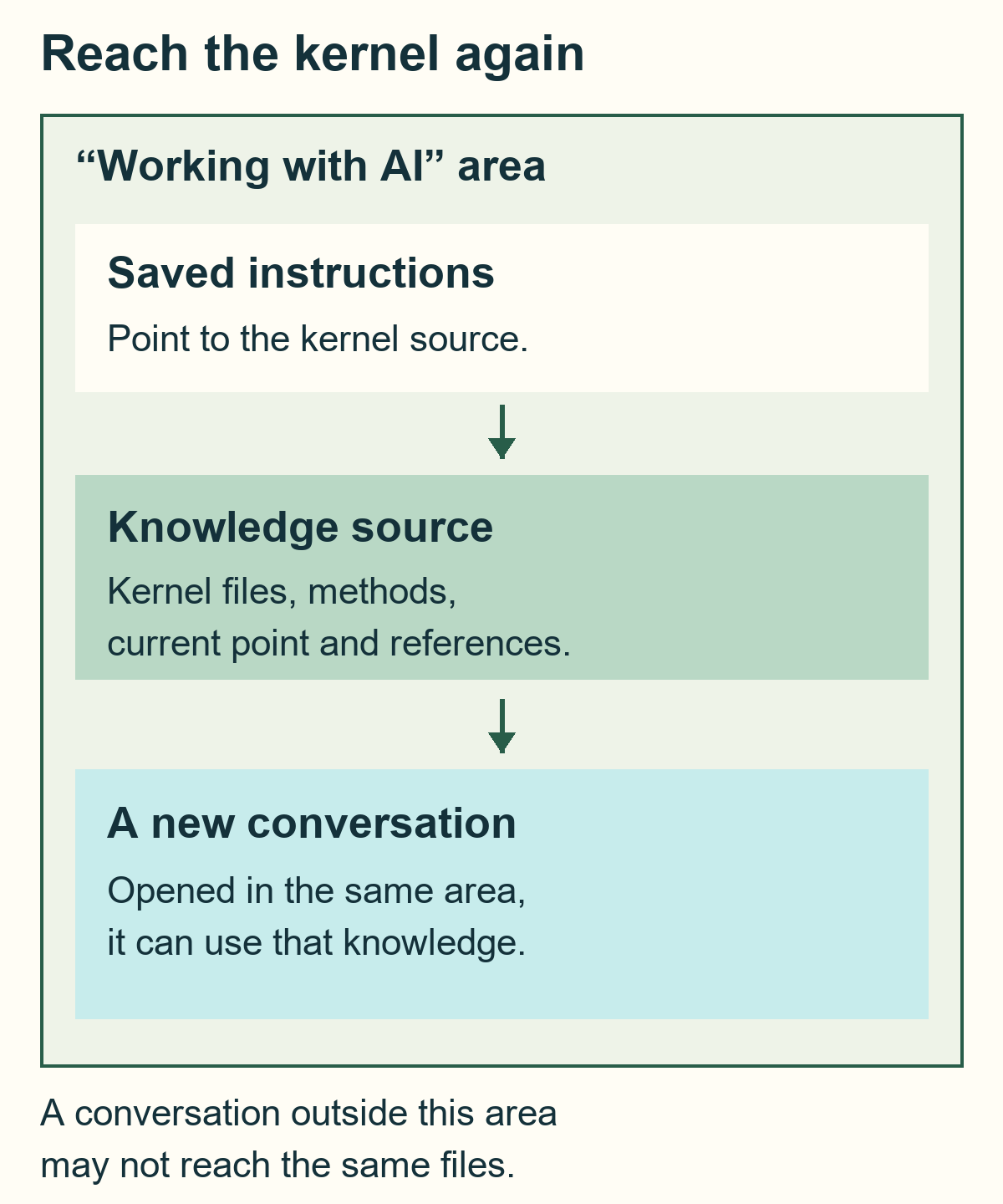
When opening a new conversation, choose the area or connection where you set up the kernel. Using the same account does not ensure that every conversation receives the same instructions or files. If the service retains only one of the two parts, identify the missing one: the material can contribute to current work while the connection needed for continuity is prepared.
For private personal or business material, choose a private source and suitable permissions. Keep passwords, access codes and keys outside kernel documents. On GitHub, private continuity uses a private standalone repository; a public fork suits deliberately public content.
If the assistant operates continuously in its own durable project workspace, with files as the surface of its ongoing work, also consider MAIOS Project Kernel. The choice follows how the work continues, even when both products use the same AI model.
4. A first task: write a faithful update
You can begin with an ordinary question, without a special startup phrase or a complete source reread on every turn. Here is a short example you can try by providing this text in the current conversation.
Fictional material: supplier’s note
Delivery expected on 12 November. The date will be confirmed after availability has been checked.
A request to try
Use this note to prepare a short customer update. Say what we know and what still needs confirmation. Use only the text I provided; make any interpretation of your own recognizable. Do not send the message.
A response consistent with the source could read:
The supplier gives 12 November as the expected delivery date. Confirmation depends on the availability check. The date therefore remains unconfirmed.
If the assistant instead wrote “Delivery is guaranteed on 12 November,” a useful correction would be specific:
The note gives an expected date, subject to a check. Correct the message and retain that condition. Improve the source-reading method with the distinction between an estimate and a confirmation, including the reason for this correction.
The correction concerns both the current text and the method that produced it. If a competence already owns that method, the assistant can deepen it; if a distinct, continuing capability is useful, it can form one. Every correction does not need a new file.
The original note remains the source. The customer message is the prepared result. The reusable criterion explains how to read related situations. Keeping these distinct lets the method change without attributing new words to the original note.
5. Keep the result and the method
At the end of the work, you can ask:
Keep the result and the reusable criterion in the appropriate source. Tell me what you actually saved and where. If you cannot write there, give me the complete updated files and explain which ones I should save or replace in my source.
Here is one possible arrangement for the delivery example. The names are readable examples; your environment may use other names while keeping the functions recognizable.
The .md extension identifies a text document: you can open it in a text editor. If your service needs another format, ask for help adapting the files and references to their actual names.
supplier-note.mdpreserves the original text, marked as fictional in this exercise.customer-update.mdholds the prepared message. Having a file does not mean the message was sent.source-reading.mdholds the competence’s criterion: distinguish statements, conditions and interpretations; the reason and source of the correction help adapt it to other cases.CURRENT.mdkeeps the current point, why it matters and what remains open. A next action belongs here only when it has actually been chosen.SOURCES.mdpoints to the note, result and method, with a short reason to reach each one.
In a repository-backed setup, CURRENT and SOURCES live in the state/ folder. In a knowledge space, they can be saved files with those names. CURRENT helps with reentry; the full method stays in its own location.
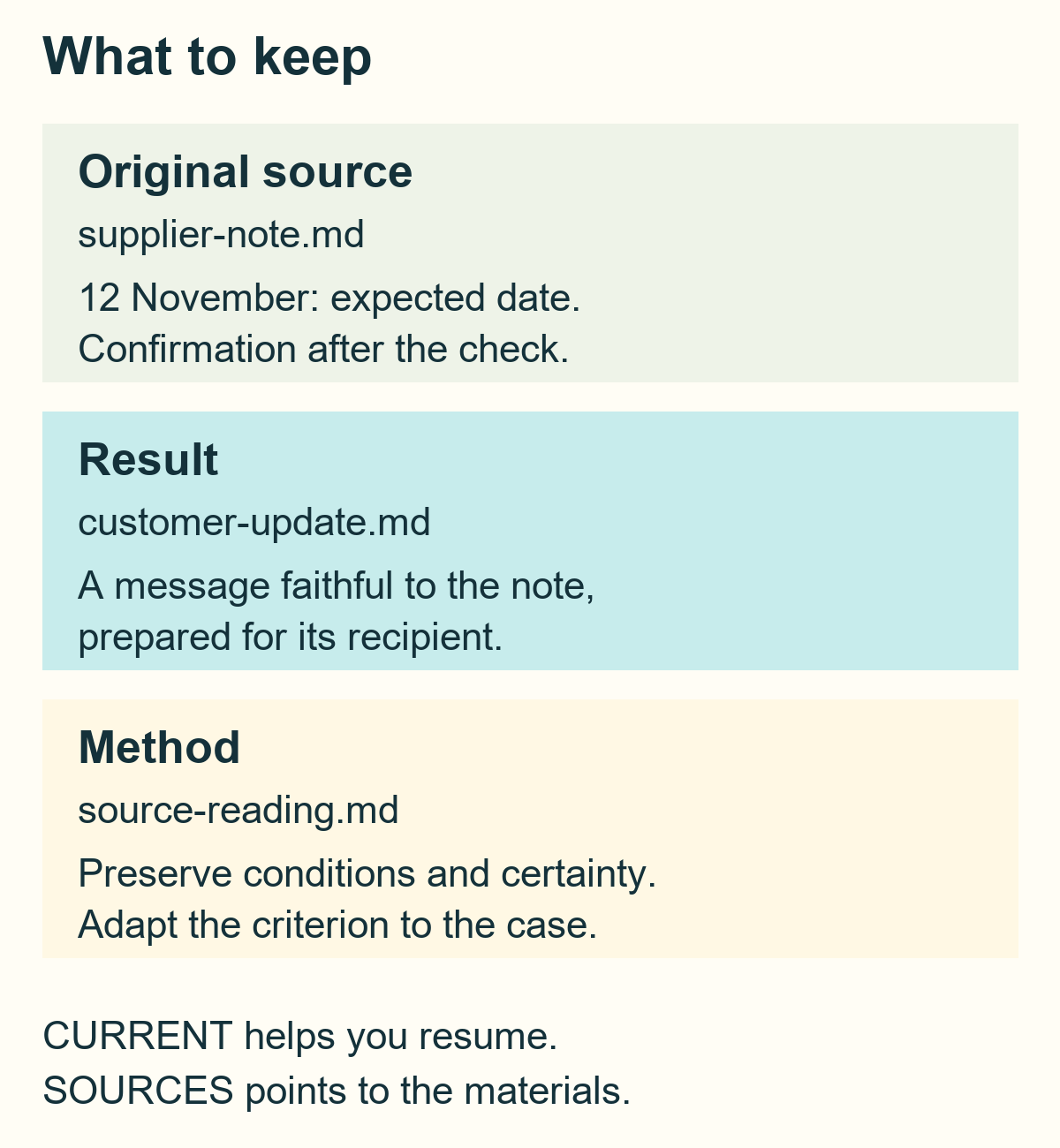
The method might say:
When summarizing a source, preserve the certainty and conditions of its statements. Distinguish what the text says from what you infer. An expected date remains expected until a relevant source confirms it. Choose the level of detail for the recipient and the decision. New evidence can change the situation: update the conclusion and explain why.
This edition includes an example folder in each language containing these five files. They are practice materials to place deliberately in your own environment; they are not the full package or a kernel installation.
If the assistant can read the documents but cannot edit them, saving continues as follows: receive the complete updated content of source-reading.md, save it under that name and replace the previous version in the space the assistant reads. If the current point or references changed too, update the CURRENT or SOURCES files it identifies. Keep the original note as the source. For real work, integrate the correction into your existing files; do not replace them with this exercise’s five files.
Saving a correction makes the knowledge available. Its usefulness becomes visible when it changes how work is approached, either now or in a later case. Here, “learning” concerns the operational knowledge used by the system; saving a file does not retrain the provider’s AI model.
6. Continue with a different case
In a new conversation, return to the space or connection where you saved the work: in the earlier example, this is “Working with AI.” If the service does not retain files between conversations, you will need to make them available again. You can write:
Continue from the current CURRENT file and the relevant sources. I have new material to examine. Use the source-reading method where it helps, adapting it to this situation.
New fictional material: maintenance note
Valve replacement completed. Testing still to be carried out.
New request
Prepare a note for the manager: what has been completed and what remains open?
The criterion developed in the first case can help produce:
The valve replacement is recorded as complete. Testing is still pending; this note does not yet establish the test outcome or readiness to return to service.
The method now preserves a different distinction from the delivery case: completion of the work and the outcome of verification. A return-to-service decision needs the relevant sources and responsible expertise for the actual case. Reusing knowledge means understanding its reasons and adapting them to the new object.
If the assistant cannot reach the saved method, it can still reason about the text in front of it. That does not demonstrate use of the retained knowledge: restore the connection or supply the correct file. A plausible answer, a competence name or recollection of the first example does not establish that continuity by itself.
When a service shortens the context of a long conversation, saved documents help recover the current point and its reasons. If the source holds an old plan, the assistant reconsiders it in the present situation; it should not execute it automatically.
7. Develop competences and possibilities
The kernel can help reuse a competence, combine it with others, deepen it or form a new one. Experience can also improve how those capabilities are recognized and developed: that is the role of metacompetences. For example, recognizing when a correction concerns one sentence and when it reveals a criterion a method should learn changes how the system learns from work.
You can contribute a good example, a source, a question or a doubt. You do not need to arrive with a fully specified solution. When a useful possibility emerges, it can be retained with its reasons while its form remains open. Recording a possibility does not automatically make it an assignment or a scheduled activity.
Contexts vary: preparing a meeting by comparing sources, adapting a study plan, improving a business procedure or reading technical documents. The relevant competences follow the activity; these examples provide starting points without defining the kernel’s limits.
Several independent assistants or kernels can also contribute to a common question through shared material and actual access. Keep clear who produced each contribution, which sources it uses and where learning returns. Cooperation can help form the question itself; it does not mean the environments automatically share memory, files or permissions.
For instance, you can ask:
I do not yet know which result to aim for. Here is the situation and what matters to me: […]. Help me understand useful possibilities and the information that could change them.
Or:
This example handles […] well. Let us see what it can teach our method, preserving the distinction between what we observe and our interpretation.
The system can also recognize and correct a limitation introduced by its own framing of the work. In this guide, the autological relationship becomes practical when the assistant can represent its operating context, available means, effects and recovery, and use that understanding to improve its method. It does not mean human awareness or consciousness.
8. Read the competence contribution
The kernel’s final replies make two functions visible, adapted to the language and medium in use:
Competences: source reading - preserves conditions and certainty; writing - adapts the message to its recipient.
Emergent possibilities: compare the note with a later confirmation, if useful.
This example attributes contributions to the work. The second line can remain empty or show “—” when no material possibility emerged. The assistant should not invent alternatives to fill it.
The trace helps you orient and can invite a closer look at an unclear contribution. Names alone do not prove the model’s internal causal path or that a method has been assimilated. The next turn again follows what the present situation needs.
9. Recover access and update carefully
If a source is unavailable, restore the connection or provide the material needed. The assistant should identify what is missing without inventing its contents. Work supported by the information already present can continue.
If writing is unavailable, save the complete file the assistant supplies in your chosen source. When replacing an earlier version, update the correct one; ask what changes are proposed and why. The person remains in control of account settings and permissions.
A new working context is added through its sources and current point. It usually does not require rewriting the kernel entry. To move to another environment, keep the kernel’s provenance, useful methods, sources and current context, then make them reachable through the new environment’s actual means. Exporting a conversation history does not configure that connection by itself.
When a new package version appears, compare it with the instance you use and preserve local learning. Update the entry instructions when the relationship they express changes; a new source version does not always require replacing them. The official user guide also reaches the deeper evolution procedures.
A method for a recurring activity can remain available without any automation. Running it at set times also requires an actual scheduling tool configured with the appropriate mandate. The kernel does not create a background process by itself.
10. The reference route for ChatGPT
This chapter describes the product’s documented ChatGPT route. Identify the features actually available in the account and tools being used; other environments use their own instruction and source-access mechanisms.
The reference ChatGPT configuration uses a GitHub repository you control, access to that repository in the chosen environment and Custom Instructions. A configurator uses Git and Python 3.11-3.14. An assistant with an authorized execution environment can run it; you do not necessarily need to use a terminal yourself.
The route has these recognizable results:
- Source prepared. A repository suited to the privacy of your work is prepared from an identified product version.
- Configuration generated. The configurator produces or preserves the instance context, CURRENT, SOURCES and the complete configured instruction text. The generated file is
adapters/chatgpt/CUSTOM_INSTRUCTIONS_CONFIGURED.md;state/INSTANCE.jsonrecords configuration identity, rather than working knowledge. - Instructions saved in the account. The person copies and saves the complete generated text in ChatGPT Custom Instructions and makes the intended source connection available. The repository configurator does not perform this account save.
- Work through the source. Real use distinguishes what can be reached, what has been written and what the work demonstrates. The official procedure also covers configuration confirmation, updates and recovery.
Until the required account save is complete, the accurate description is “repository configured; host activation still pending.” A screen, a generated file or read access does not establish all the other results by itself.
To ask for assistance:
Guide me through the kernel_chat 1.2.0 ChatGPT route using INSTALL and the adapter guide. Identify the available means, preserve my content and distinguish repository configuration from saving the instructions manually in the account. Give me the complete text when my action needs it.
Commands and maintained procedures belong to the ChatGPT installation guide and ChatGPT adapter guide. Do not share passwords or access codes with the assistant.
11. Find your way and the sources
To start from your own environment, return to chapter 3. For a small task, use chapter 4; to understand what remains and how to continue, follow chapters 5 and 6. Chapter 7 explores how new capabilities can develop. Read the guide straight through or enter at the point useful now.
This edition’s public sources refer to kernel_chat 1.2.0. The links pin that version; later revisions have their own documentation.
- Introducing kernel_chat: purpose, capabilities and portability.
- Prepare the environment: entry, durable source, practical methods and references.
- Understand adoption: actual compatibility, tools and user control.
- Use and evolve the kernel: everyday work, continuity, competences and updates.
- Portable entry and portable guide: shared instructions across compatible environments.
- ChatGPT installation and ChatGPT adapter: the reference technical route.
You can return to the guide while working: to understand a possibility, correct a result or recover useful knowledge. Adoption in your own environment follows the route and sources in chapter 3.