
From an everyday task to MPK
Imagine asking an AI assistant to work with some documents. It needs to understand what you want to achieve, use suitable material, choose a method and preserve what it learns. MAIOS Project Kernel, or MPK, organises this way of working through knowledge and instructions the assistant can read, use and evolve.
An AI assistant is a system you can talk to in ordinary language. Depending on the available tools and access, it can also read documents, write files or perform other operations. Your direction, material and corrections contribute to the work; you can ask for explanations and redirect it.
The kernel organises how the assistant understands, acts and learns. In the package, this knowledge is written in files: instructions, competences and references that the assistant uses during work. It is called semantic because it connects the meaning of requests, sources, choices and results.
If you are using this site's Chat, you can already ask a question or paste a short text you choose to share. The Chat can help you understand or compare it and prepare a result you can copy. For a first trial, use invented data such as the example below.
A trial here, in the site Chat
Use two invented summaries: A reports 90 requests in 3 months; B reports 80 in 2 months, counting the same kind of request. Help me prepare six lines for a meeting: what can we compare, and with which criterion? Distinguish what the data show from what we would still need to know.The site Chat does not open folders on your computer or save files there. To work directly on your documents and preserve the kernel's knowledge in the folder, continue with an assistant that can read and update it. If you are unsure which environment you have, describe the application you use and ask where to begin. The “Installation and first entry” section accompanies that transition.
This guide also welcomes readers with little AI experience. If you still need to set up MPK, start with “Installation and first entry”. If it is already in the folder opened with your assistant, you can start with a first task. The internal functions provide depth when needed; you can also begin with an open question and clarify it with the assistant.
What working through competences means
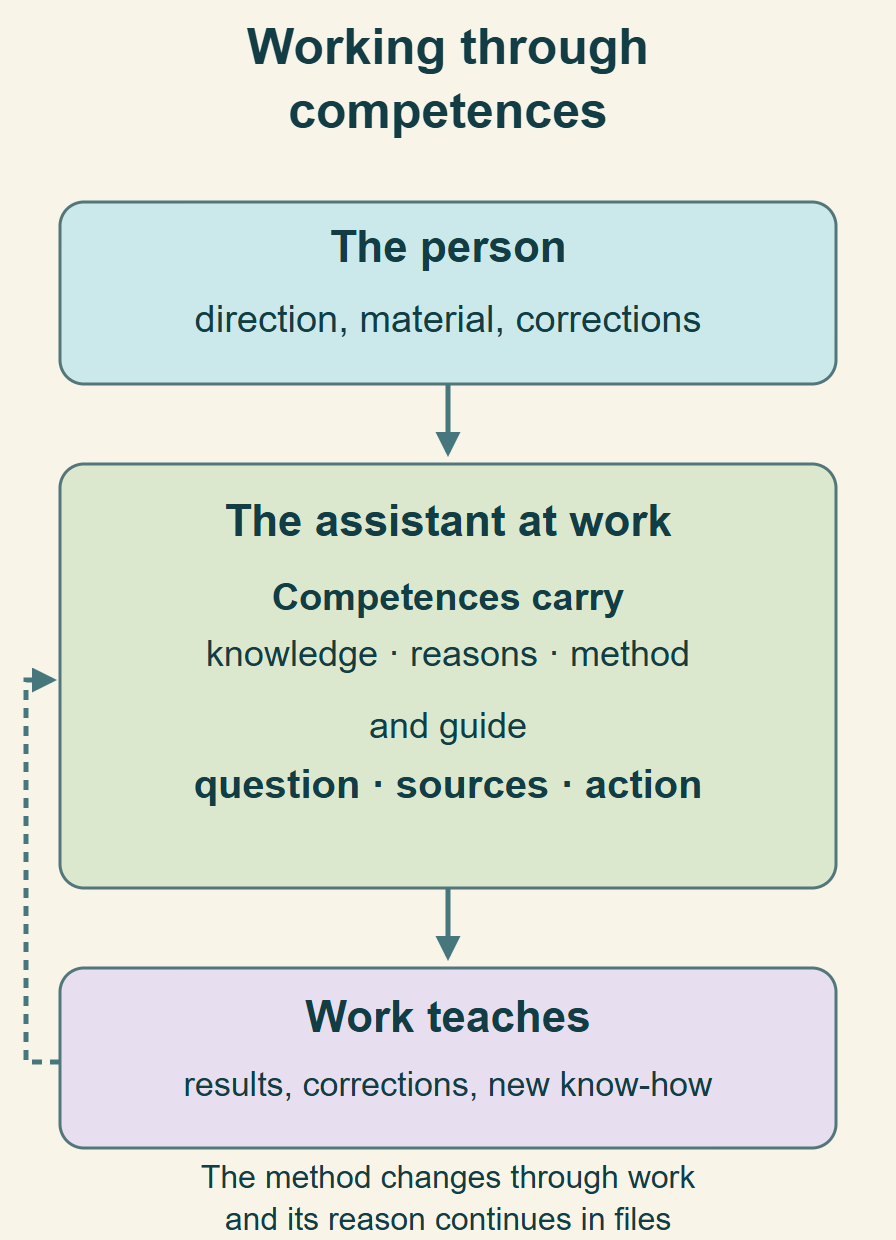
We can ask directly for a result, such as a document comparison or an offer. Competences already participate in understanding that request, choosing sources and forming the method. Concrete action grows from that knowledge in the present context.
A competence is organised know-how: it carries knowledge, sources, criteria, reasons and methods useful to a kind of work. When comparing documents, for example, it helps understand what the data means, which differences matter and which comparison is meaningful. A tool can read a table; the competence guides its use and interpretation.
In the files you may encounter the word skill: it is an operational entry into a competence’s knowledge. The assistant follows its instructions and references. A competence may already exist, combine with others or develop through work; each request does not need a new file.
The person contributes direction, material and corrections. The assistant recognises suitable competences, reaches their knowledge, composes them and deepens or forms them when the work calls for it. Knowing every skill name beforehand is not a requirement for starting.
If the assistant is acting on an overly narrow first interpretation, the relation with context and competences can be recalled. That recall corrects the present movement; it is not a formula to repeat with every request.
Reorienting the work
Reread the situation and sources through the pertinent competences. Consider whether the first interpretation narrowed the question or excluded useful possibilities, then continue from what you understand.An example: understanding changes work in progress
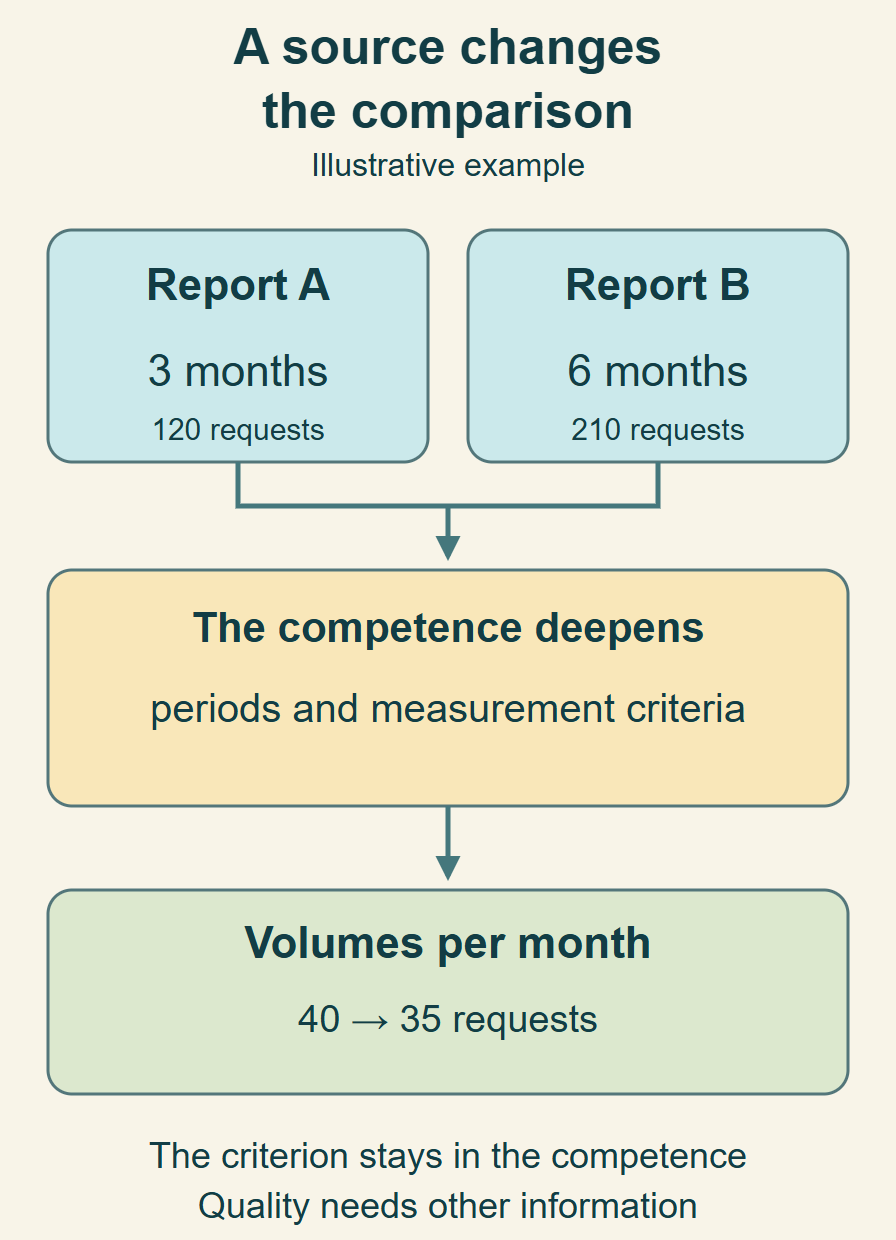
Example with synthetic data: you want to compare two summaries for a meeting. A reports 120 requests over 3 months; B 210 over 6 months. B has the higher total, but the periods differ in length. Source understanding and comparison know-how change the criterion: to describe monthly volume, the averages are 40 requests for A and 35 for B.
A useful result may include a comparison of compatible data, reasons for the choices and what is missing to conclude about the rest. If a reusable criterion emerges, the assistant integrates it into the pertinent competence. A note saying “we compared two reports” records the event; explaining how to recognise periods of different lengths also teaches a method. The new knowledge can already change this same task. The example explains a possible use; it is not an experimental finding.
Choose the measure in relation to the question. Totals describe volumes within their respective periods, whose durations should be stated. To compare frequency, use the same unit, such as requests per month. An average describes that period: it does not require each month to have the same count and does not show variation within it. Explaining causes or making forecasts requires further evidence.
- A useful response: “B has 75% more requests in total over twice the time. The monthly average changes from 40 to 35, a 12.5% decrease”.
- What the conclusion means: these are request volumes. Those numbers alone do not establish whether service quality or speed improved.
- What teaches the competence: choose a basis consistent with the question and preserve the reason. If a source corrects B’s period to 3 months, its average becomes 70: recalculate rather than repeat the previous result.
The same way of working in different contexts
Comparing reports is one example. The relationship between sources, competences, results and learning can take other forms:
- In a business, prepare an offer using customer requirements, constraints and previous work; preserve the reasons behind decisions for later offers.
- In an industrial setting, read a procedure and service reports to understand a recurring issue; distinguish data, hypotheses and checks for the appropriate specialists.
- In professional work or research, understand an open problem, compare sources and reformulate the question when a new distinction changes the work.
A first task and how to recognise its value
Once MPK is reachable in the working folder, you can speak to the assistant in your own words. A prompt is simply the message you use to ask a question or give an assignment. The following is one possible start; you can adapt it without knowing competence names.
Make both documents available to the assistant: put them in the working folder you opened, for example in a subfolder called materials, or attach them if the environment can read attachments. Give their exact names in your message, such as SUMMARY_A.md and SUMMARY_B.md. If they are elsewhere, a name or path in a message does not automatically provide access; ask which documents it can read.
A task to adapt to your documents
MPK is in this folder. Read its entry instructions and use the relevant competences. SUMMARY_A.md and SUMMARY_B.md contain requests received over two periods. Prepare six lines for our meeting: how does monthly volume change, and what can we conclude from the data? Explain your criterion. Tell me if you cannot read a file or a decisive fact is missing.AI can make mistakes or misinterpret a request. Sources, explanations of criteria and your corrections help reveal this. For an important choice, check the material and consequences that matter: the kernel helps maintain that connection during work.
You can observe what changes in the work: the assistant understands the result you need, uses suitable sources, explains important criteria and corrects a reading when you show a difference. A result may also clarify what is missing to decide. A competence name in a summary helps orientation; its consequences in the choices make its contribution recognisable.
If it seems to ignore the documents or repeat a generic answer, first ask which material and instructions it can actually read. An unreachable file and a method that needs correction call for different interventions. You can ask for a brief explanation of sources and choices, then clarify what matters.
Make the contribution visible
Briefly explain which sources and criteria guided this result and what you corrected. Show me where to open the result and which knowledge files you actually updated; make clear when an update is only proposed.Here, learning means improving the operational knowledge kept in files: for example, the criterion for comparing periods. The assistant can use it during the current task and find it in a later session, meaning a new conversation, if it can read those files. Earlier conversations alone do not ensure this continuity. You can read, correct and preserve the updated knowledge alongside the work.
At the end you can ask: “Where do I open the result? Where did you preserve the criterion we will use again?”. The assistant should identify the actual files and briefly explain their contents. In this example, the summary is the comparison result; the work guide helps resume; competence knowledge preserves how to choose and correct the comparison. You can ask for corrections to these texts without knowing every technical folder name.
Installation and first entry: two routes
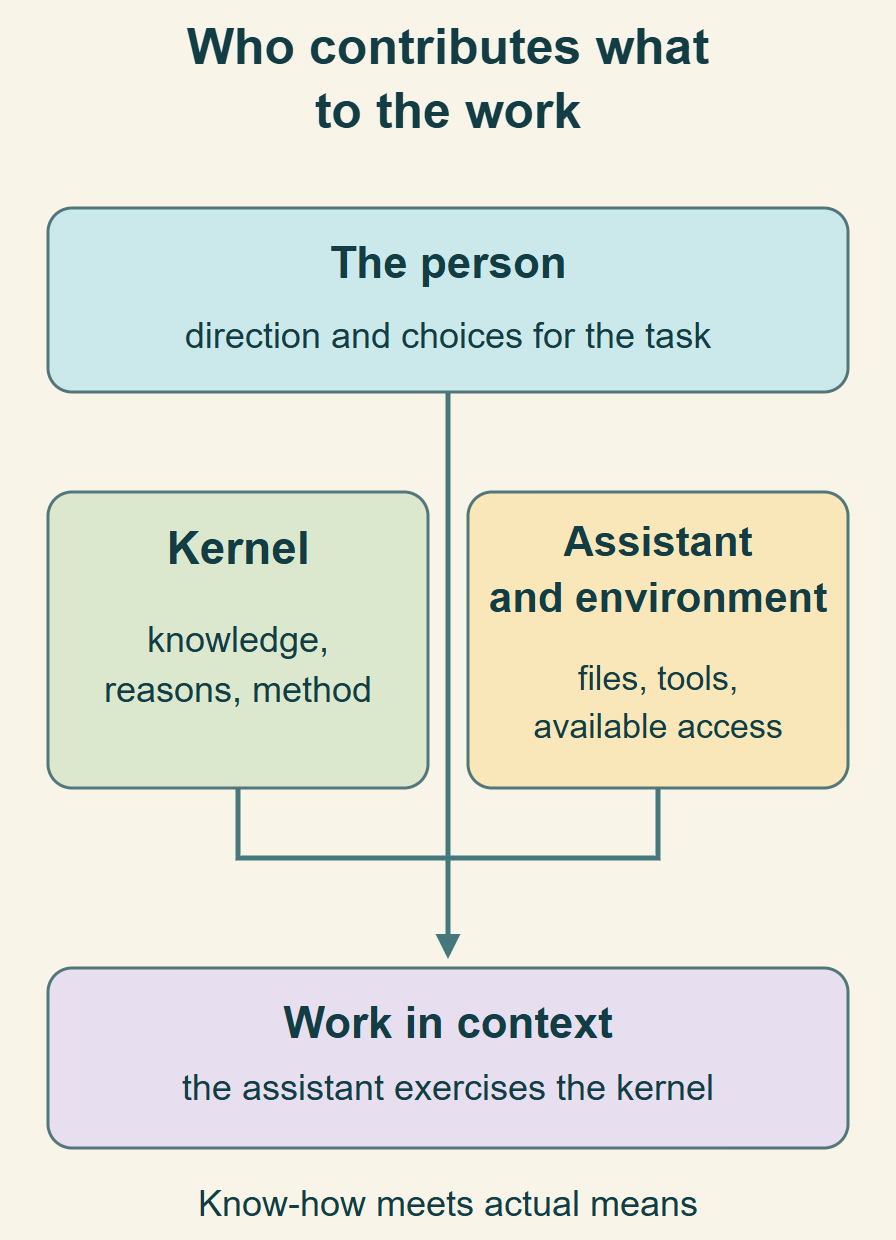
Using MPK requires an assistant able to read the kernel folder and follow its instructions. To preserve what it learns, it also needs to update the pertinent files. The environment, also called a host, is the application in which you use the assistant and the means it supplies. You can ask which files it can reach before entrusting the work.
Standalone MPK and a package produced by the Form have distinct entries. The former integrates the kernel into a selected folder; the latter already delivers accepted Form context in the project.
The folder containing the source package and the folder where you will work have different roles. For standalone entry, open the package with the assistant and choose where to integrate the kernel; after integration, continue in the working folder the assistant identifies. For the Form route, the extracted folder already contains the delivered kernel and context: start there. In either case, the assistant can identify the folder currently open.
Ask for standalone integration
I have opened the MPK package. I want to use it in [working folder path], with this assistant. Follow INSTALL.md and the package instructions, check the preview and conflicts, and preserve existing material. Complete the integration consistent with this request; clarify any decisive missing choice with me. Then tell me which folder to open and where to start.- Standalone distribution: use the official repository or installable package. The assistant follows package instructions, previews the changes for the selected folder and host, and applies the authorised plan. In the target it reads AGENTS.md and START_HERE.md.
- Form package: extract the ZIP into a working folder, open it with the assistant and follow AGENTS.md, START_HERE.md and START_WITH_YOUR_ASSISTANT.txt. The Form supplies an initial direction and context; the assistant develops what is needed without repeating accepted acquisition.
Entering from a Form package
Read AGENTS.md, START_HERE.md and START_WITH_YOUR_ASSISTANT.txt in the package folder. Reach the kernel competences and accepted context, explain what you understand and continue with the useful work that emerges.The installation and management tools supplied by MPK require Python 3.11 or later; qualified support covers 3.11–3.14 on Linux, Windows and macOS. The host needs access to the files and required means. Installation prepares the entries; first use shows how the receiver reads and acts through them.
Orienting the work and recognising continuation
- State the result or situation, what is already available and conditions that matter. Exploration can begin with an open direction.
- Correct a reading that changes the meaning of the request. Explain the reason when the correction can teach a useful criterion.
- Distinguish a proposal from a decision entrusted to the assistant, and clarify effects that need the person’s involvement.
- Ask where reusable knowledge should continue when it changes how work is done. The kernel has this capacity; a recall helps when that relation is not participating.
- At reentry, reach the current guide, state and sources: preserved knowledge enters the present together with what has changed.
Continuing useful understanding
This distinction also changes how later cases should be approached. Integrate its meaning and reasons into the pertinent competence and our reentry guide, preserving sources and what remains open.A brief account of active competences can make the assistant’s attribution correctable. The useful observation remains what changes in choices, result and continuation. A name or file alone does not prove that its knowledge participated.
Resuming, collaborating and updating
In the site Chat, the conversation can be recovered within the same browser session; this continuity is different from a file in your project. To keep a result, ask for text you can copy and save it in a document you choose. “Contribution” prepares a message for the website, which you review and confirm. When working with MPK in a folder your assistant can reach, ask which result, work-guide and competence files were actually updated.
Before interruption, the kernel preserves the useful continuation relation: direction, reasons, current source, results, competences and live questions. Another session or agent can reach it. When a conversation is shortened so work can continue — sometimes called compaction — the summary helps locate the work. Sources and the current situation still determine its meaning.
Resuming after interruption
Reenter through the kernel entries and work guide. Recover the current context, reasons and competences already formed; compare them with new sources and continue without repeating completed operations.Several agents or kernels can contribute distinct knowledge and means. Common knowledge does not automatically transfer access, experience or authority. Starting work at set times or on events requires an available scheduling system.
When a new version arrives, compare the distributed base, local knowledge and proposed source. Integration preserves what the project has learned and recovery of affected files. Downloading a ZIP makes the new source available; it does not itself migrate an evolved installation.
The relations that orient the kernel
KA, FDLA and Meta_Skill name functions that constitute MPK’s way of operating. Their operational knowledge is already in the public 5.5.0 distribution and installable package. Using it does not require access to the private repositories where the system originated.
A repository is an organised collection of files. MPK’s public repository contains the texts and tools delivered to its users. The references below open the exact texts included in the version 5.5.0 package.
- KA — Kernel Assiomatico: keeps the relation with the actual situation and sources, leaving open what may become pertinent. A first representation must not become the entire possibility field.
- FDLA — Funzione di Libero Arbitrio: recognises and corrects distortions introduced by the assistant while question, method and response take shape.
- Meta_Skill: recognises, composes, deepens and forms useful capacities. The way capacities are formed and learned can itself evolve through work.
For example, a first tool failing to read a table does not establish that the work is impossible: KA keeps understanding open to the whole situation. If the assistant had turned “compare the documents” into “summarise them”, FDLA lets it recognise and correct that change. Meta_Skill makes reading and comparison capacities pertinent and able to evolve. These functions cooperate within the same work; the person does not need to activate them one at a time.
These public texts carry the necessary know-how into the receiving context. They do not import the complete private repositories, their access or later updates. Actual reading and use depend on the present assistant and conditions of the work.
Internal functions and what they serve
This map brings together the main operating relations of version 5.5.0. Functions can cooperate in one competence; a source or result can reveal further combinations. Links reach the public operating knowledge.
Understanding the situation
Connects intent, people, sources, facts and open questions. Context can still be taking shape: understanding it can already be useful work.
Makes what matters and which question to address recognisable, without inventing missing context.
MPK source: Understanding the situationUnderstanding relations and representations
Reads source meaning and recognises when a name, schema or first question represents only part of the situation.
A new distinction can change the question and method during the work.
MPK source: Understanding relations and representationsAcquiring knowledge and means
Reaches relevant knowledge, examples, documentation and tools, understanding their use, provenance and conditions.
Brings useful know-how into the method; distinguishes missing knowledge from a tool or access that still needs connecting.
MPK source: Acquiring knowledge and meansForming possibilities
Recognises relations and directions that become useful in context. Keeps a possibility’s source and reason before its form or timing is known.
Supports exploration, choice and concrete work from the present, without executing an old plan merely because it was remembered.
MPK source: Forming possibilitiesForming and composing competences
Reuses, deepens, composes or forms useful capacities. A competence carries knowledge, reasons and a way of working, and can improve through experience.
A request, new source, success or correction can form reusable know-how.
MPK source: Forming and composing competencesImprove how competences are formed
Work can also teach how to recognise, acquire and form new capabilities. For example, understanding why a criterion was incomplete can improve the method used to form other competences, including in different domains. This knowledge can give rise to specialist competences or kernels dedicated to a domain.
Work can change the criterion through which the system learns and forms further work.
MPK source: Improve how competences are formedExplaining with sources and meaning
Forms texts and explanations in which subjects, reasons, proposals and results remain recognisable. Adapts depth to the situation and participants.
The person can understand and correct choices that change the work.
MPK source: Explaining with sources and meaningCoordinating contributions
Connects local work, other competences, agents or kernels according to their useful contribution and actual means. Each contribution returns to the work it serves.
Preserves participants’ responsibilities, sources and learning without conflating access or experience.
MPK source: Coordinating contributionsAdapting the kernel to its environment
Connects instructions and competences to how the current assistant reads files, discovers skills, uses tools and resumes context.
An available path or named environment becomes operational when the receiver actually reaches and uses it.
MPK source: Adapting the kernel to its environmentPreserving reasons and continuation
Keeps current state, decisions, sources, acquired methods and open questions reachable. A new session resumes from the present and that knowledge.
Work can continue across interruptions, conversation summaries and changes of assistant while retaining its reasons.
MPK source: Preserving reasons and continuationContinuing an activity
It connects the entrusted purpose to work know-how and, when available, a system that starts it at set times or in response to events. Instructions can evolve with experience.
The method can improve through work, while cadence and effects remain tied to actual means and mandate.
MPK source: Continuing an activityFollowing actions and consequences
Preserves meaning from sources to actions and distinguishes what was completed, remains pending or has an uncertain outcome.
At reentry the actual outcome can be checked before repeating an operation, and learning can reach the relevant competence.
MPK source: Following actions and consequencesIntegrating new knowledge
Compares the distributed base, locally evolved knowledge and the new source, preserving useful contributions and recovery.
Product evolution can enter the work while respecting what the instance has already learned.
MPK source: Integrating new knowledgeUseful questions at first use
Do KA and FDLA require access to private repositories?
No. MPK 5.5.0 delivers their operational know-how in public texts included in the package. The assistant reaches them through the system competence. The complete private repositories and their later updates are not part of that delivery.
Do I need to create competences before working?
Start from existing capacities. Recognition, composition and formation take place in the work when they change the result. A sufficient competence can act directly.
Does the kernel retrain the AI model?
Operating knowledge evolves in the competences, guides and sources reachable by the agent. Version 5.5.0 does not retrain model weights.
Can I use MPK before defining a project?
Yes. A question, research, a domain or an ongoing activity can supply context. Understanding can be the first useful result, and a project is organised when needed.
What happens when a tool is missing?
The assistant distinguishes knowledge to acquire from a missing means or access. It can continue independent work and explain the condition of the effect requiring that means.
How can I tell whether the kernel is participating?
Through the relation among sources, criteria, choices, result and continuing knowledge. A short, correctable explanation can help; a skill list alone does not establish use.
Who controls the work material and knowledge?
Knowledge preserved in the kernel can be reached in your environment’s files, according to where you keep them and who has access. You can read it, correct it and keep a copy. The AI service and tools have their own data-handling terms; using MPK does not itself change those terms.
Sources and further reading
This guide describes MPK 5.5.0, Project Kernel family 3.0.0. Constitutive capacities and the methods deepened in this release remain connected to their sources. Individual observations retain their own context and conditions.